FAQ
Frequently asked questions about telephony, process and CRM integration
The most important points about integrating telephony into CRM, back office, callback processes, call forwarding, call documentation and internal workflows.
What does telephony integration into CRM and back-office processes mean?
Telephony integration means that calls are not handled separately from the rest of the workflow, but are directly connected with contacts, cases, customer information or internal processes. This makes conversations easier to trace, callbacks easier to handle in a targeted way and information more transparent for the team.
Can calls be started directly from a CRM or administration system?
Yes. Calls can be started directly from contacts, customer records, cases or other screens. This eliminates manual intermediate steps, phone numbers do not have to be searched for or transferred separately, and the connection to the relevant case is maintained.
Can incoming and outgoing calls be documented?
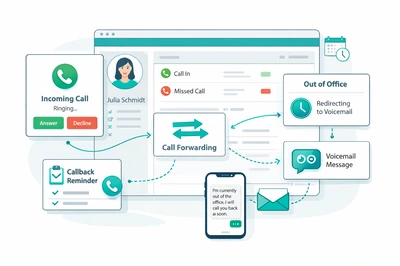
Yes. Incoming, outgoing and missed calls can be recorded with status, additional information, contact reference and case reference. This helps make call histories traceable and ensures that open responses are not overlooked in day-to-day work.
Are structured callback processes possible?
Yes. Callbacks can be organized with priority, status, responsibility and time validity. Clear callback lists and traceable workflows can replace personal notes, verbal reminders or scattered individual information.
Can forwarding, absences and availability be represented?
Yes. Forwarding, extensions, absences and availability can be systematically integrated into the software logic. This allows calls to be routed more specifically instead of running into nowhere or being passed on manually within the team.
Can customers be informed automatically when someone is unavailable?
Yes. When someone is unavailable, calls can, for example, be routed to suitable announcements or contacts can be informed automatically by SMS. This improves communication, reduces lost enquiries and ensures that workflows remain controlled even outside direct availability.